AI TM Cleaner: Full Translation Memory Cleanup and Quality Improvement
For translation teams and TM administrators: review TM entries for translation, terminology, and wording issues, then write back selected changes after human confirmation.
Install the package for your Trados Studio version, then follow the plugin's first-run setup in Studio. AI TM Cleaner requires a license that includes TM Cleaner; it is not available under the unlicensed trial. AI features use your own model API, and provider usage fees are separate. Trial and license details
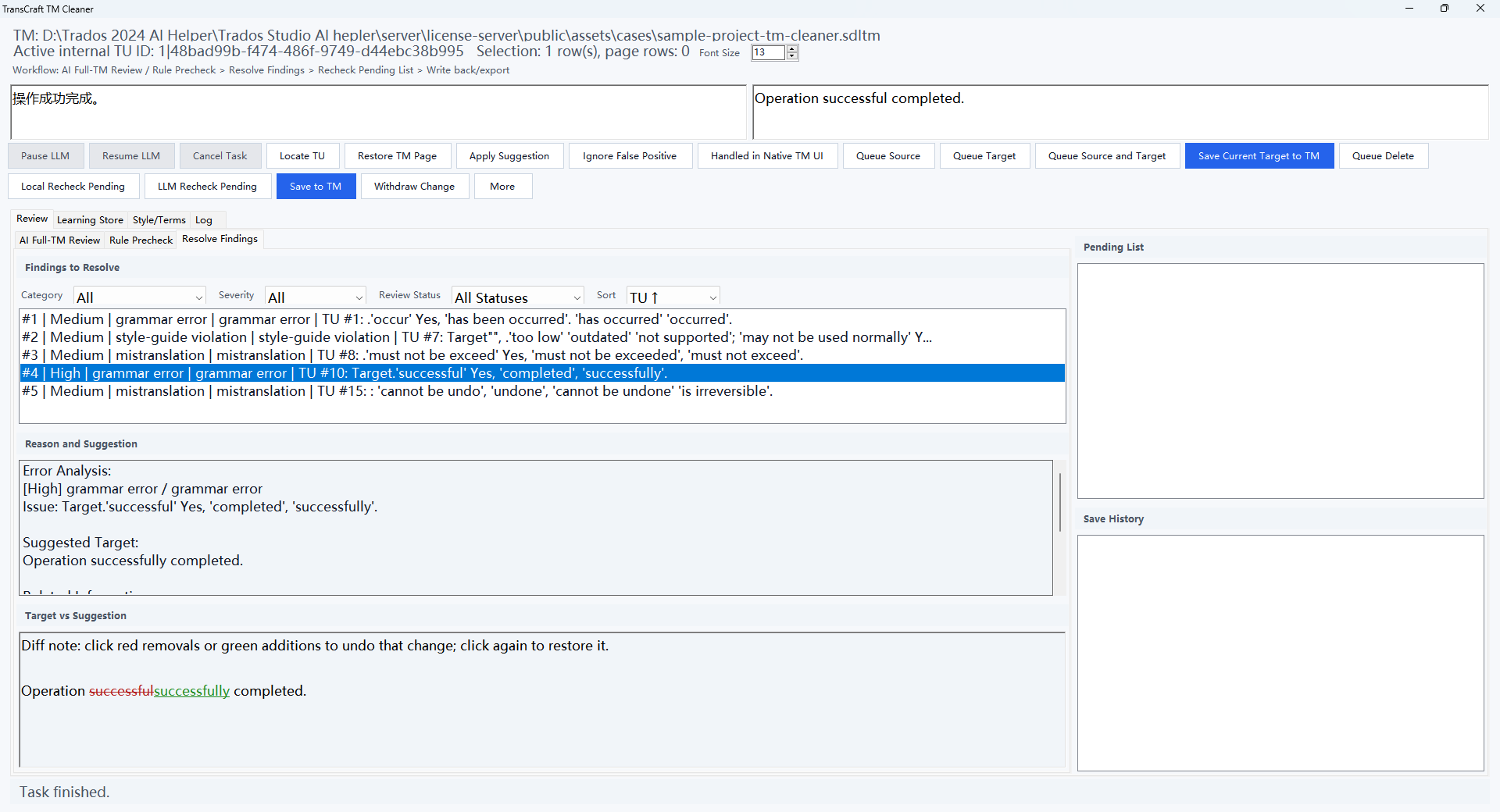
Example context
A translation memory used over time can contain inconsistent terminology, outdated wording, or translations that need review. Administrators need to locate and inspect these entries before reusing them.
Workflow
Connect the target TM in Trados Studio, run AI TM Cleaner, and inspect the suggestions. Check each suggestion against its source and the project terminology before writing back selected changes.
How this helps
Bring entries that need review and their suggested corrections into one workflow to support TM maintenance. Administrators decide which changes to accept, and subsequent projects still require quality checks.